Key Takeaways
Stop wasting ad budget on cold audiences by automating your retargeting funnel with Zapier and Google Sheets. This workflow captures real-time email engagement from Instantly, uses a custom Apps Script to filter for high-intent leads (opens/clicks), and syncs them directly to Google Ads. The result is a zero-touch system that boosts ROI by ensuring you only pay to retarget prospects who have already shown interest.
Marketing Automation Objective:
Improve ROI from cold email campaigns by retargeting only the most engaged leads—those who opened emails multiple times or clicked on links—through a fully automated, no-touch workflow.
Challenge:
Most retargeting strategies waste budget on a broad audience. This client needed a lean system that could identify high-intent prospects in real time and trigger retargeting ads automatically—without manual intervention.
Step 1: Real-Time Engagement Tracking via Zapier
The first step was connecting Instantly with Google Sheets using Zapier to record email engagement as it happened:
- Email Opened: Each time a recipient opened an email, a row was added in Google Sheets.
- Link Clicked: If a recipient clicked a link, another row was recorded.
This allowed the marketing team to capture detailed, timestamped insights into each recipient's behavior—without needing to export or sort through campaign reports manually.
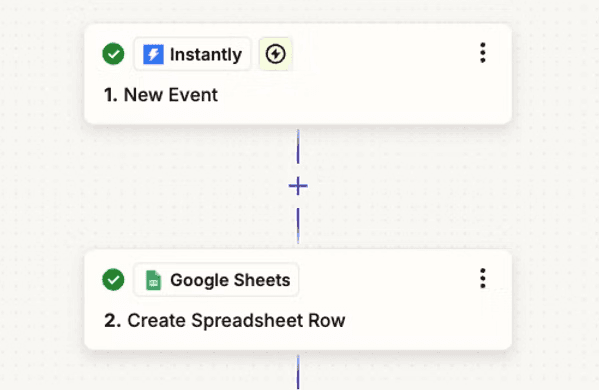
Zap for Instanlty event Trigger
Step 2: Filtering Qualified Leads with Google Apps Script
Every four hours, a custom Google Apps Script reviewed the engagement data and applied predefined logic:
- Identify contacts who either:
- Opened the email more than once, or
- Clicked a link.
- Move these contacts into a dedicated Filtered Emails sheet.
This ensured that only engaged leads moved forward in the funnel, significantly increasing the chances of conversion and reducing unnecessary ad spend.
code link
Step 3: Retargeting Engaged Prospects with Google Ads
The Filtered Emails sheet became the basis for a Google Ads Customer Match audience. These qualified leads were automatically added to a custom list that received:
- Personalized Google Ads
- Increased frequency of brand impressions
- Contextually relevant messaging based on prior engagement
This created a seamless pipeline from email outreach to ad retargeting, aligned with actual user interest and behavior.
Conclusion
By integrating real-time engagement tracking, automated lead filtering, and precision-targeted ad campaigns, the client achieved:
- A sharper focus on high-quality leads
- Reduced marketing waste
- Improved ROI from both email and paid channels
This marketing automation workflow not only saved time but also delivered better results by ensuring only the right prospects were retargeted. A perfect example of automation done right.
Explore Our Case Studies
Explore how we collaborate with B2B partners to upscale their marketing activities
View Case Studies